Plan Your Socials with a Content Planner for Social Media
By Fay & Form Studio · 7 October 2026
Running a small business or creating content can feel like a constant juggle. Social media often falls to the bottom of the list, or it becomes a last-minute scramble. Consistent, thoughtful social media is important for connecting with your audience and growing your brand. This is where a content planner for social media becomes your helpful tool. A content planner is where ideas wait, so posting day is only for posting. It brings order to the chaos. It helps you plan a month of social media content with confidence.
Why You Need a Content Planner for Social Media
Imagine knowing exactly what you'll post next week, next month, or even next quarter. No more staring at a blank screen, wondering what to say. A dedicated content planner for social media helps you achieve this clarity. It's more than just a calendar; it's a strategic tool. It helps you map out your message, stay consistent, and avoid burnout. Just as a budget planner helps manage your finances, a content planner organises your social media efforts.
For Australian creators and small business owners, your time is precious. Every minute spent on social media should be effective. Your planner lets you work smarter, not harder. You can dedicate specific blocks of time to planning and creation. This leaves you free to focus on other parts of your business.
Building Your Content Pillars
Before you start filling your content calendar, know what you want to say. This is where content pillars come in. Content pillars are the main themes or topics you regularly discuss on social media. They help you stay focused. They ensure your content is relevant to your audience.
Think about your business and who you're trying to reach. What problems do you solve? What value do you offer? Your pillars should reflect these. Here are some common content pillar examples:
- Educate: Share tips, how-tos, industry insights, or explain complex topics.
- Inspire: Share motivational quotes, success stories, or behind-the-scenes glimpses.
- Connect: Ask questions, run polls, share user-generated content, or tell personal stories.
- Promote: Showcase your products or services, announce sales, or share testimonials.
- Entertain: Share relatable humour, trending sounds, or lighthearted content.
Aim for 3-5 core pillars. This gives you enough variety without spreading yourself too thin. For instance, a handmade jewellery business might have pillars like "Crafting Process" (Educate/Inspire), "Behind the Scenes" (Connect), "New Collection Showcase" (Promote), and "Styling Tips" (Educate).
Batching Your Content Creation
Batching is a helpful method for social media. It means dedicating specific time blocks to complete similar tasks all at once. Instead of creating one post every day, you create all your posts for the week or month in a single session. This improves efficiency and consistency.
Here's how a batch-planning workflow typically works:
- Idea Generation: Brainstorm all your ideas for the month, linking them to your content pillars.
- Content Drafting: Write all your captions, scripts, or blog post outlines in one go.
- Visual Creation: Take all your photos, record your videos, or design your graphics.
- Scheduling: Load everything into your chosen scheduling app.
This method saves you time. You're in a specific creative zone. You don't have to switch tasks constantly, which can break your focus. Our Content Planner Digital includes a batch-day checklist. It helps you structure these sessions for better results.
Your Weekly Content Calendar
Once you have your content pillars and understand batching, it's time to build your weekly content calendar. This maps out exactly what type of content goes out on which day. It helps you visualise your content flow. It ensures a good mix of topics and formats.
While specific 'best' times or days can vary, consistency is always key. For many small businesses, posting 3-5 times a week on platforms like Instagram and Facebook works well. For LinkedIn, 2-3 times might be more effective. The goal is quality over quantity. Don't post just for the sake of it.
When planning your content calendar, consider:
- Content Mix: Aim for a balance of your content pillars. Don't just promote your products.
- Format Variety: Mix up photos, videos, carousels, Reels, Stories, and text-only posts.
- Audience Habits: When is your audience most active online?
- Call to Action: What do you want people to do after seeing your post?
A well-structured content calendar ensures you're always providing value, engaging your audience, and moving towards your business goals.
Capturing Ideas with Your Content Planner
Ideas can strike at any moment: during a walk, while scrolling, or in the shower. The trick is to capture them before they vanish. A dedicated section in your content planner is perfect for this. An 'idea bank' and a 'hook bank' are valuable for creators.
An idea bank is simply a place to jot down any and all content ideas, no matter how small or rough. Don't filter yourself. Just get them down. Later, you can review these ideas and see which ones align with your content pillars or current campaigns.
A hook bank is for those attention-grabbing first lines or visuals that stop the scroll. These could be questions, bold statements, surprising facts, or intriguing visuals. Having a ready supply of hooks means you're never stuck for a strong opening to your posts or videos. This approach makes sure your content planner becomes a living document, always ready for your next big idea.
Choosing the Right Content Planner Template
The right tools make all the difference. When it comes to managing your social media, a good content planner template can streamline your entire workflow. You have options: digital or printable. Choosing the right content planner template is key to an organised approach.
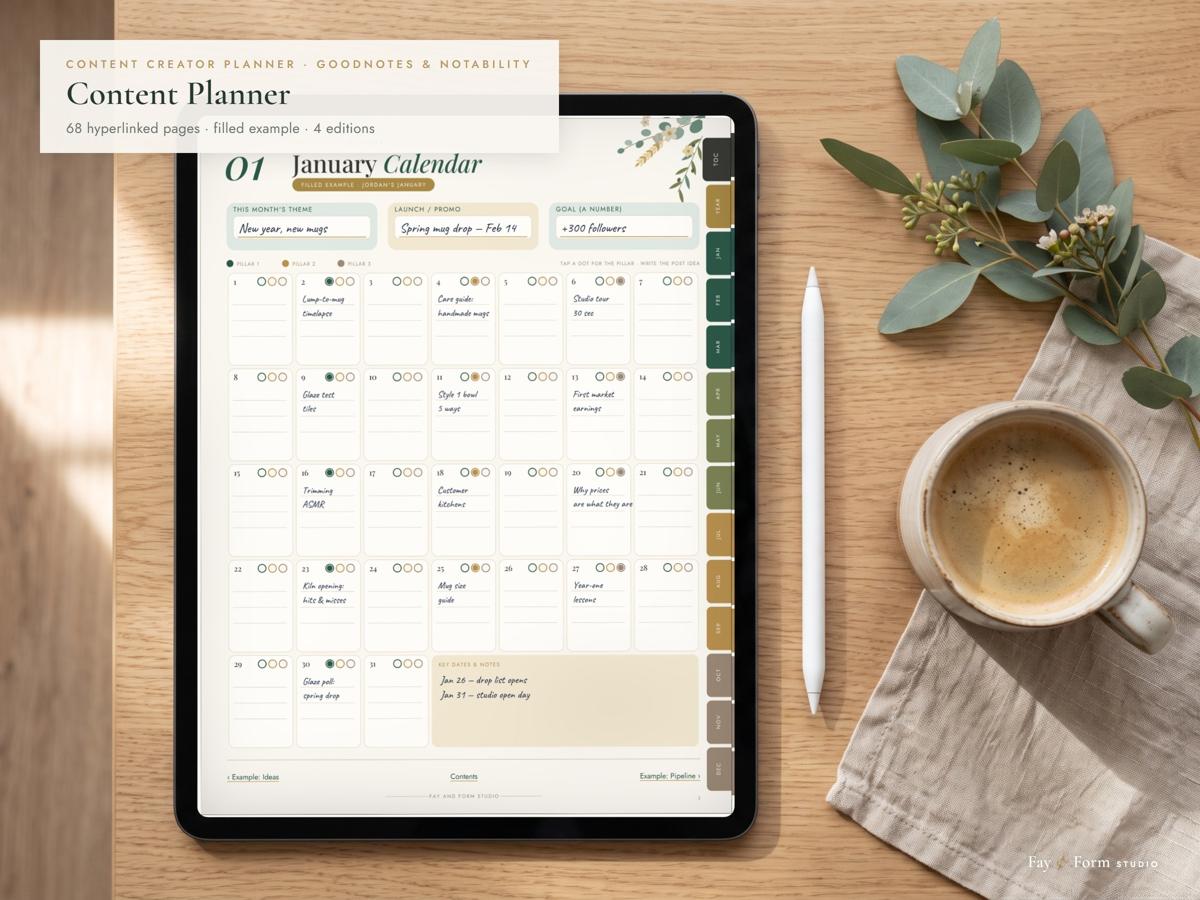
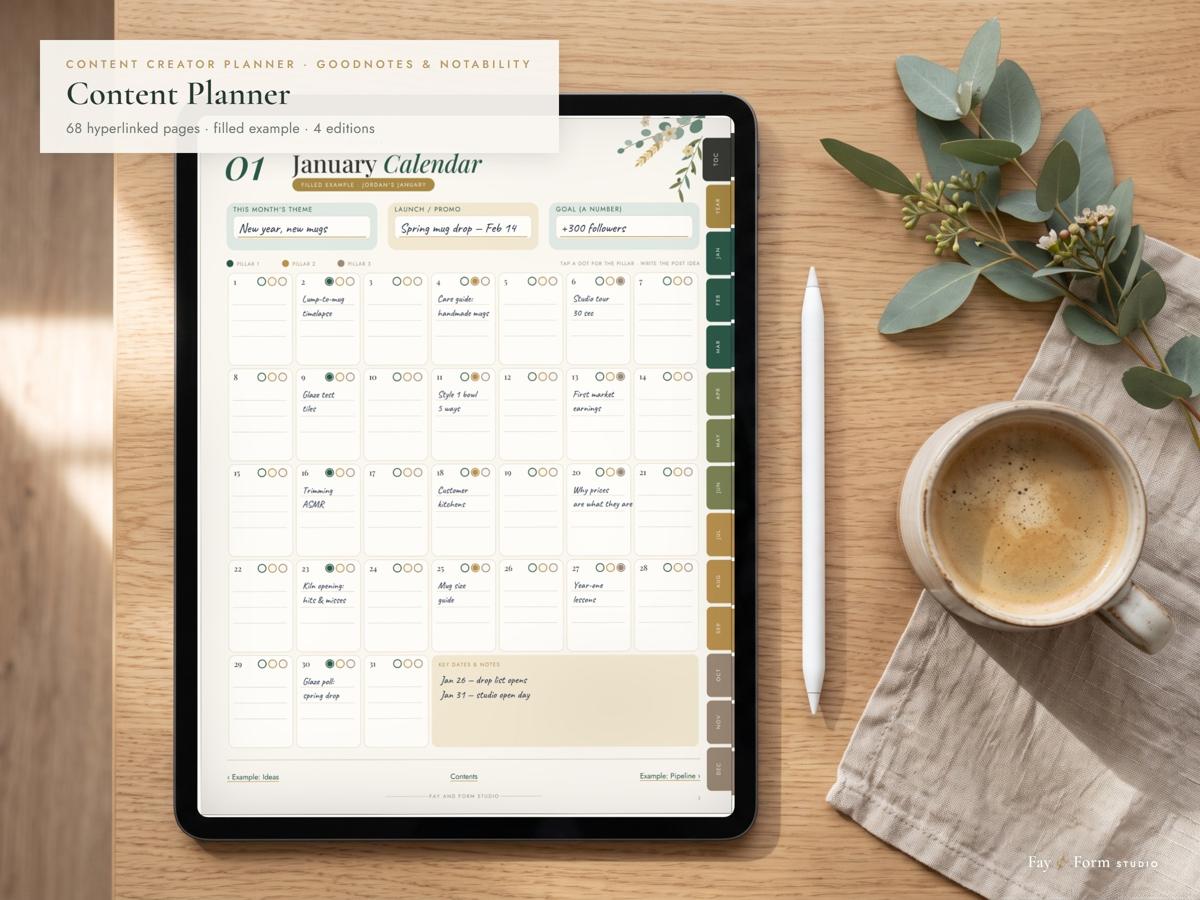
We designed the Content Planner Digital (A$14.90) specifically for creators and small businesses. It's a batch-planning workflow that takes you from idea, to draft, to posted, to what actually worked. This digital planner is full of features over its 68 pages and 1,200+ links. It includes a filled example showing Jordan's pages for a small creative business, content pillars guidance, platforms & tags, an idea bank, a hook bank, and a launch planner. You'll find 12 months of calendars, a pipeline to track your content (idea → draft → scheduled → posted), and a review section with fill-in rings to assess performance. It also offers quarter reviews, a Year in Content summary, a repurpose map, a batch-day checklist, and a collab & outreach log. With side tabs for every month and a one-tap Contents page, navigation is simple.
Every download of the Content Planner Digital comes with five files: the main US Letter fillable PDF, a handwriting version with no text boxes, an A4 version for Australia, the UK and Europe, a separate layout designed for phone screens, and a 'Start Here' guide. It works as one standard, hyperlinked PDF with bookmarks, made for apps like GoodNotes, Notability, Noteshelf, Xodo, Flexcil, and PDF Expert on iPad and Android tablets. There's no app lock-in and no subscriptions.
For those who prefer pen and paper, our Printable Content Planner (A$9.90) offers a simple paper edition. It's designed to print well at home, with white pages, light tints, and thin outlines. This means it prints well in colour or black and white. It uses less ink than a full-colour planner. The 65 undated pages include a 13-page filled example at the front, showing how each template works. You can print one copy of each template and reprint whenever you need more. Both Fay & Form planners are digital downloads, priced in Australian dollars (AUD).
Monthly Review: What Worked, What Didn't
Planning and creating content is part of the process. To improve, you need to review your efforts. At the end of each month, take time to look back at your content calendar. What performed well? What didn't resonate? This simple monthly review is important for growth.
Look at your engagement metrics: likes, comments, shares, saves. Which posts received the most interaction? Which ones drove traffic to your website or attracted new followers? The fill-in rings in our Content Planner Digital are designed to make this review process simple. They allow you to quickly mark what worked and identify areas for improvement.
Don't be afraid to learn from what didn't work. Maybe a certain topic didn't land, or a specific format wasn't engaging. Use these insights to adjust your content pillars, experiment with new ideas, and refine your approach for the next month. You can also identify evergreen content that can be repurposed or updated.
Frequently Asked Questions
How far ahead should I plan social media content?
For most creators and small businesses, planning a month of social media content offers the best balance. It provides enough structure for consistency and batching, while still allowing flexibility to react to current events or new opportunities. Some businesses might plan quarters, but a month is a great starting point.How many posts a week should a small business publish?
Quality always trumps quantity. For platforms like Instagram and Facebook, 3-5 high-quality posts per week are often effective. On LinkedIn, 2-3 posts might be sufficient. The key is to be consistent and to post when your specific audience is most active. Listen to your analytics to find your sweet spot.
Is a content planner better than a scheduling app?
A content planner and a scheduling app work best together. A content planner is for strategy, idea capture, and mapping out your content calendar. It's where you think and plan. A scheduling app is for execution; it automates the posting of content you've already created and planned. They are complementary tools, each vital for a smooth social media workflow.
Consistent, thoughtful social media doesn't have to be difficult or time-consuming. With a clear strategy, dedicated time for creation, and the right tools, you can build a strong online presence that connects with your audience. A content planner for social media provides the framework you need to make this happen.
Ready to bring order to your social media? See the Content Planner Digital